
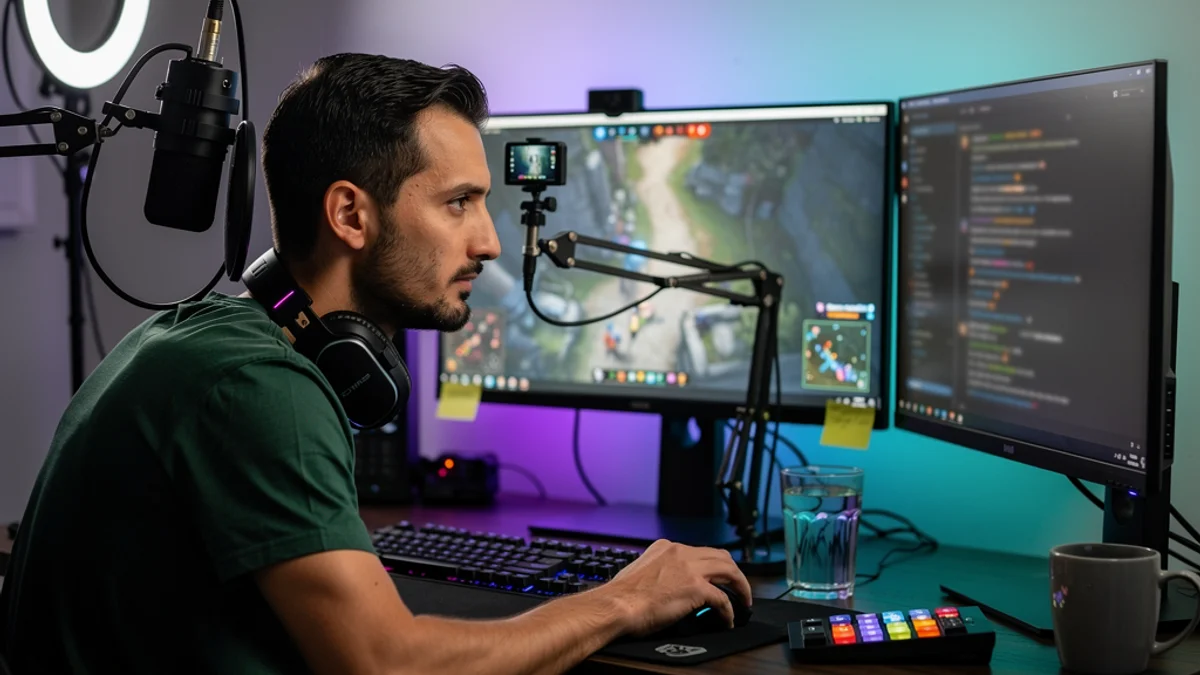
Hour six is usually when it shows up. Chat is still moving, the game is still running, and at some point your face slid down and slightly left in the webcam frame. Chin forward, shoulders rolled in, hips halfway to the front edge of the seat. You never decided to sit like that. You’ve been in the chair since two o’clock, the broadcast never gave you a reason to stand, and nobody in chat was going to mention it.
The numbers here are worse than most people assume. A 2019 study in BMJ Open Sport & Exercise Medicine surveyed 65 collegiate esports players who practise up to ten hours a day. Neck and back pain came back at 42%, wrist pain at 36%, hand pain at 32%. Fifteen per cent reported “3 hours or more of sitting and playing without standing to take a break.” Then there’s the finding that should stop you cold, because it says everything about how this problem gets handled: “Only 2% had sought medical attention.”
Most streamer posture advice is office ergonomics with a webcam glued on top. It tells you to raise your monitor, which is good advice right up until it pushes your face out of frame. This guide covers the parts of the problem that actually belong to streamers - the camera, the microphone, eight hours of talking, and breaks you have to produce instead of simply taking.
Why Streamer Posture Is Its Own Problem
Streaming and office work look identical from the outside. Person, chair, screen. Five things separate them, and every one pushes you toward the same collapsed shape.
- The broadcast has no natural end. A work task finishes. A meeting finishes. A stream finishes when you decide it does, and there’s always a reason to run it one more hour - a raid coming in, a good chat, a run you want to complete.
- Your camera and your monitor want different things. Good ergonomics puts the screen high. Good framing puts your eyeline near the lens. If your webcam sits on top of a properly raised monitor, you’re now looking up at the game and your chin lifts. Mount it lower and you look down all night.
- You’re talking the entire time. Nobody else at a desk is producing six hours of continuous speech. Your ribcage matters far more to you than it does to a spreadsheet analyst, and a slouch closes it down.
- Your gear pulls you off centre. A boom mic on one side, a chat monitor on the other, a stream deck within reach of one hand. You drift toward all of them, all day, in one direction.
- Breaks are a production decision. Standing up mid-stream means running a BRB screen, an ad break, or a stretch of dead air. Most streamers weigh that against retention and stay put.
So the hours you already spend in that chair are the biggest lever you’ve got. Worth engineering the shape you hold during them.
What Eight Hours in the Chair Actually Costs
Start with the neck, because it takes the first hit. Your head weighs around ten to twelve pounds sitting balanced on your shoulders. Tip it forward and the effective load climbs fast. The Cleveland Clinic puts a slight glance down at “the equivalent of a 27-pound weight,” a 30-degree tilt at “40 pounds,” and a significant forward lean at “upwards of 60 pounds of force on your neck.” Chiropractor Andrew Bang, DC describes the knock-on effect plainly: “your shoulders round as you hunch forward to improve your view of the screen,” and over time “we see cervical disks in your spine degenerating because of that forward head posture.”
Those pound figures come from a biomechanical model, so treat them as a description of load rather than a prediction of injury. What makes them yours is duration. A phone glance lasts twenty seconds. A stream lasts eight hours, and the forward lean is baked into the job.
The prevalence data backs that up. A systematic review and meta-analysis published in Sports Medicine - Open in January 2026 pooled results across esports players and found a one-year pain prevalence of 73%. The spine was the single most affected region at 41%, neck pain turned up in 48% of players, and wrists in 37%. A 2022 review in BMC Musculoskeletal Disorders pooled 16 studies covering 62,987 participants. Eight of those studies found significantly increased odds of musculoskeletal disorders, with odds ratios running from 1.3 to 5.2, and the body parts that came up most often across the whole set were the neck, the shoulder and the back.
This is the streaming version of tech neck, stretched over a much longer session and performed in front of an audience. The rest of this guide is about defusing it without redesigning your content.
Set the Camera First, Then the Monitor
Every posture guide tells you to raise your screen. Every streaming guide tells you to get the camera at eye level so you’re not filming up your nose or down at your forehead. Stack a webcam on a raised monitor and those two rules start fighting each other, which is the specific problem generic ergonomics writing never has to solve.
Stop treating them as one object.
Mount the camera independently. A cheap desk-clamp arm or a small tripod frees the camera from the monitor entirely. Put the lens at roughly eye height, slightly above if you want a flattering angle, and place it as close to the centre of your main screen as your setup allows. Sitting it off to one side produces that permanent quarter-turn of the head across a whole broadcast.
Then set the monitor properly. Top third of the screen at about eye level, roughly an arm’s length away. OSHA’s guidance for seated computer work is the target you’re aiming at: head “level, forward facing, and balanced,” generally “in-line with the torso,” with the back “fully supported with appropriate lumbar support,” thighs and hips “generally parallel to the floor,” and feet “fully supported by the floor or a footrest.” Our monitor height and neck pain guide goes deeper on getting that measurement right.
Frame with the camera, not with your spine. When your face sits too low or too far left in the shot, the instinct is to shuffle your body until it looks right. Move the camera instead. Any correction you make by leaning is one you’ll be holding for the next six hours.
Fix your elbows while you’re down there. OSHA wants elbows “in close to the body” and “bent between 90 and 120 degrees,” with the desk or armrests set so your shoulders stay down instead of hiked toward your ears. If your armrests are high enough to force your shoulders up, drop them or take them off.
Get the geometry right once and it works for every stream afterwards without you thinking about it. The best desk setup for posture guide covers chair, desk height and screen distance in more detail if you want to do the whole thing properly in one afternoon.
The Slouch Is Quietly Costing You Your Voice
You talk for a living. Everything that comes out of your mouth on stream runs on air, and air runs on how much room your diaphragm has to move. Slump forward and your ribcage closes down over it.
There’s measurement behind this. A 2018 study in BioMed Research International tested 35 healthy young men in upright and slouched sitting and measured inspiratory muscle strength using sniff nasal inspiratory pressure. Upright came in at 93.5 cmH2O. Slouched dropped to 84.8, a mean difference of 8.7 (p = 0.04). The authors put it down to “reduced diaphragm tension and movement as a result of altered body posture.”
Small study, young healthy men, one specific pressure measurement. Treat the number as a signal, not a law. The mechanism isn’t controversial though, and it lines up with what a long stream feels like from the inside. Six hours in from a collapsed position, your breath support is shallower, you push harder from the throat to keep the energy up, and your voice thins out. Streamers usually put that down to tiredness. Some of it is the shape you’re sitting in.
The fix costs nothing and works immediately. Sitting tall opens the space back up. If you’ve ever noticed you sound better in the first hour than the fifth, test it: next time your energy dips, sit back, let your ribcage open, take one proper breath from the belly, and listen to what happens to your voice.
Your Gear Is Pulling You Off Centre
Ergonomics guides assume a symmetrical desk. Streaming desks are never symmetrical, and the asymmetry compounds over a long session.
- The boom mic. You know you sound better close to it, so you drift toward it. One shoulder forward, head tilted, held for hours. Bring the mic to your mouth on the arm instead of bringing your mouth to the mic, and re-check its position every time you adjust your chair.
- The chat monitor. Reading chat on a screen off to one side means a small neck rotation repeated a few hundred times a night. Put chat on your primary display as an overlay or a docked panel if your game allows it, or at minimum keep the second screen close to the main one instead of at a right angle.
- The stream deck. A deck parked far to one side pulls your whole torso across every time you hit a scene. Keep it within reach of a relaxed arm, not an extended one.
- Keyboard and mouse. Same rules as gaming. Wrists roughly straight, no reaching, and a break from the death grip between rounds. Wrist and hand pain showed up in 36% and 32% of those collegiate players, and early strain is far easier to reverse than chronic strain.
Do a quick audit off-stream. Sit in your normal position, close your eyes, then open them and notice which way your body is facing. If it isn’t squared to your main screen, something on that side of the desk is pulling you.
Build Breaks Into the Broadcast
How you sit matters. How long you stay there matters at least as much, and this is where streaming is genuinely harder than office work, because leaving your chair costs you something visible.
Treat breaks as part of the production instead of an interruption to it.
- Use the BRB screen deliberately. You already have one. Most streamers deploy it for the bathroom and nothing else. A scheduled two-minute BRB at the top of every hour reads to viewers as professional pacing, and it gives you a stand-and-move window that doesn’t depend on willpower.
- Stand during ad breaks. If you run ads, you already have a recurring gap where nobody is watching you. That’s a free movement break you’re currently spending sitting down.
- Use the dead time you already have. Queue times, matchmaking, loading screens, downtime between games. Stand up, roll your shoulders back, look at something across the room.
- Aim for five minutes an hour. The esports health specialists at 1HP recommend you “take a 5-minute break at least ONCE every hour, or after 1-2 competitive games.” Their posture cue is worth stealing too: chest up, chin tucked, shoulder blades back.
- Alternate sitting and standing. Cornell University’s Ergonomics Web is specific about the rhythm: “every 20 minutes stand for 8 minutes AND MOVE for 2 minutes.” We break that pattern down in the 20-8-2 rule guide. An eight-hour broadcast won’t hit it perfectly. Getting halfway there still beats eight unbroken hours by a mile.
- Drink water on purpose. Keep a full glass in reach and you’ll need to get up eventually, which quietly turns hydration into a movement timer.
One more number from that BMJ study: 40% of those players did no physical exercise at all. Movement outside the chair is doing more work here than any single piece of gear you could buy.
Resets That Look Fine on Camera
Sometimes you can’t leave. You’re mid-boss, mid-bit, mid-conversation with a viewer who has been waiting an hour to talk. These are small enough to do live without anyone noticing anything odd.
- The chair reset. Slide your hips all the way back until your lower back meets the chair. Takes two seconds and undoes the slow forward slide that eats most long streams.
- The chin tuck. Draw your head straight back over your spine, as if making a double chin, and hold for a beat. It looks like you’re thinking. It directly counteracts the forward-head position that builds all night.
- The shoulder roll. Roll both shoulders up, back and down once, finishing lower than you started.
- The reset breath. One slow breath in through the nose, letting your belly move instead of your chest. Doubles as the pause before a sentence, and it reopens the ribcage you’ve been sitting on.
- Look away. Focus on something across the room for a few seconds. Eye fatigue was the single most reported complaint in that BMJ survey at 56%, above every musculoskeletal problem on the list.
Save a few proper desk stretches for the end of the broadcast, when you’re off air and can move without an audience.
The catch with all of these is memory. Nobody forgets to sit up because they don’t care. You forget because you’re running a game, reading chat, hitting scene transitions and talking without a script, and your own body is the one thing in the room without an alert attached to it. That gap is what a posture tool fills, by watching the position you can’t feel and giving you one quiet nudge when you’ve drifted. That’s what SitApp does: the Droid learns what your good posture looks like, then pings you when you slide out of it, running entirely on-device so no video ever leaves your machine. Which matters more than usual when there’s already a camera pointed at you.
Frequently Asked Questions
What is the best chair for a streamer? Any chair that keeps your lower back supported and your hips all the way against the backrest. Racing-style gaming chairs look the part, but the bucket shape often tips your pelvis backward and flattens your lumbar curve. A plain office chair with firm lumbar support beats an expensive throne you slide forward in. Our posture for gamers guide covers the gaming-chair question in full.
How do I keep my webcam at eye level without wrecking my monitor height? Mount them separately. Put the camera on its own arm or tripod at roughly eye height near the centre of your main screen, then set the monitor with its top third at eye level and an arm’s length away. Stacking the camera on the monitor is what forces you to choose between good framing and a neutral neck.
Does slouching actually affect how I sound on stream? It affects your breath support, which affects your voice. A 2018 study measuring inspiratory muscle strength found it dropped significantly in slouched sitting compared with upright. Less room for the diaphragm means shallower breathing, which usually means pushing more from the throat and sounding thinner late in a long stream.
How often should I take a break during a long stream? Aim for around five minutes out of the chair every hour, plus micro-resets in between. Use what the broadcast already gives you - ad breaks, queue times, loading screens, a scheduled BRB screen at the top of the hour. The exact number matters less than never sitting frozen for three hours straight.
Is streaming eight hours a day going to cause permanent damage? Pain and stiffness are common and usually reversible once the setup and the movement habits change. The research links longer playing time to higher musculoskeletal risk, which is an argument for fixing your geometry now instead of after it becomes chronic. Only 2% of players in that BMJ survey had seen anyone about their symptoms, and that delay is what turns a fixable problem into a lasting one.
The Bottom Line
Nothing here asks you to stream less. The hours are the job, and you can hold a much better shape while you work them.
Tonight, do the two-second version. Slide your hips back until your lower back touches the chair, drop your shoulders, and take one breath that moves your belly instead of your chest. Do it once at the top of each hour and you’ve already beaten most of the drift.
This week, sort the geometry. Get the camera off the monitor and onto its own mount at eye height, set the screen so the top third sits at eye level about an arm’s length away, and move whatever is currently pulling you sideways closer to centre. Twenty minutes of adjusting pays back over every broadcast after it.
Then there’s catching the drift, and hour six feels exactly like hour one until you stand up. If you’d rather not police yourself live on camera, SitApp watches your position on-device and nudges you when you slide, so your attention can stay on the stream where it belongs.
There’s also a dedicated posture app for gamers page covering alert styles that won’t blow up your overlay, dark-room detection for a lights-off setup, and what the free tier includes.
