
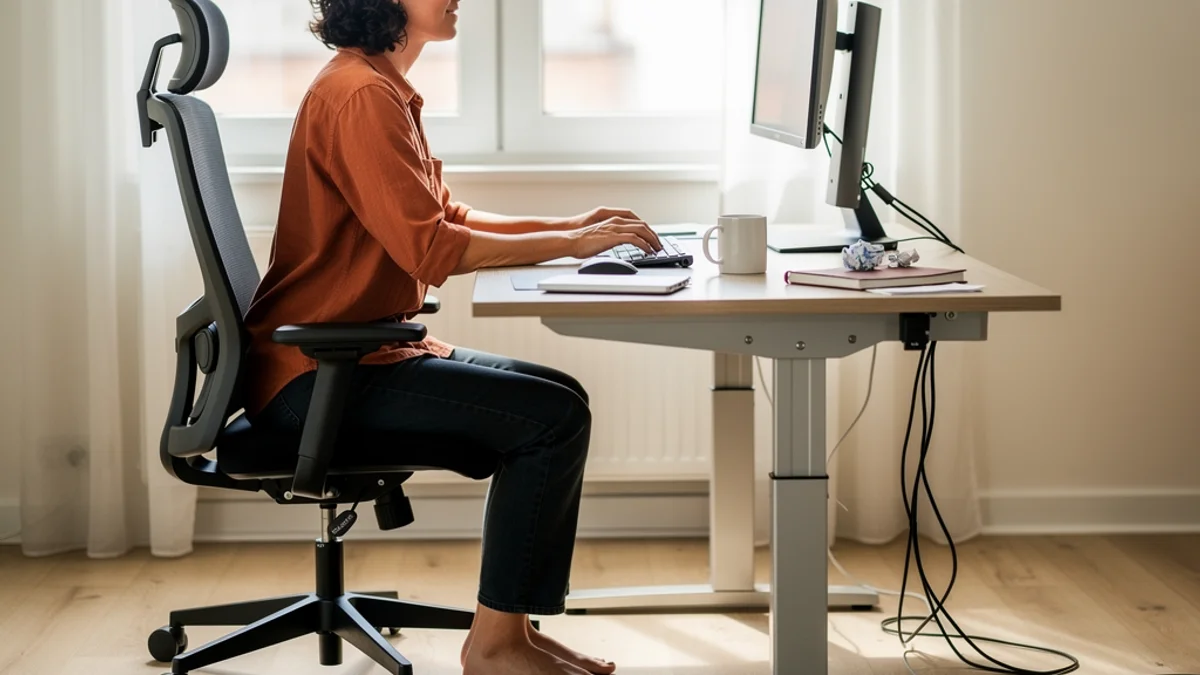
A good desk setup for tall people starts from your elbow height. Set the chair so your feet are flat, bring the desk up to your seated elbow height, put the top of the screen at or just below eye level, and use a chair with a deeper seat and a taller back.
Furniture standards are designed to fit people up to about 6’2” (188 cm). The further above that you are, the more likely it is that a standard desk is too low.
Why standard desks don’t fit tall people
Office furniture guidelines aim to fit everyone from a 5th-percentile woman to a 95th-percentile man. The University of Washington’s office furniture design guidelines, which draw on the ANSI/HFES 100-2007 and BIFMA G1-2013 standards, describe that as 90% of the population. They add that the 10% outside it, tall people included, may need furniture sized outside the normal parameters.
In the CDC’s NHANES body measurement data for 2015-2018, the 95th-percentile height for US men aged 20 and over was 187.4 cm (73.8 in). So at around 6’2” you’re already at the edge of what the standards plan for.
Fixed desks follow those standards. The UK and European desk standard, BS EN 527-1:2011, sets fixed-height desks at 740 mm, plus or minus 20 mm, according to a summary from UK office furniture maker Task Systems. That’s 72-76 cm, or about 28.3-29.9 in.
The BIFMA G1-2013 range for a seated keyboard surface, quoted in the UW guidelines, runs from 22.6 to 29.4 in (57.4-74.7 cm). A standard desk sits near the top of that range. It roughly suits someone at the top of the design range and tends to come up short for anyone taller.
So you end up choosing. Set the chair high enough for your legs and your elbows sit above the desk while your thighs hit the underside. Drop the chair to fit under the desk and your knees end up above your hips. One tall Hacker News commenter said that “most desks jam up my shoulders.”
Find your desk height from your elbows
Height charts that give one desk height per body height ignore proportions, and two people of the same height can have very different leg and torso lengths. The Canadian Centre for Occupational Health and Safety (CCOHS) gives a rule of thumb that seat height is about one-quarter of body height, then warns that this is “only a rule of thumb since the torso-to-leg ratio can vary widely.” Measuring yourself is more reliable.
- Set the chair first. OSHA’s chair guidance says the height is right when the whole sole of your foot rests on the floor and the back of your knee is slightly higher than the seat.
- Sit back and relax your shoulders. Let your upper arms hang by your sides, with your forearms pointing forward and roughly level.
- Measure from the floor to the underside of your forearm at the elbow. This is your seated keyboard height. OSHA’s keyboard guidance says your elbows should be about the same height as the keyboard.
- Subtract the height of your keyboard, measured from the desk surface to the home row. What’s left is roughly the desk height you want.
- For a standing desk, repeat standing up in the shoes you normally wear at your desk.
Write both numbers down. If your seated desk height comes out above about 76 cm (30 in), a standard fixed desk will be too low for you.
How to raise a desk that’s too low
Risers or leg extenders. These are the cheapest fix for a fixed desk that’s a few centimetres short. OSHA’s desk guidance suggests raising the work surface “by inserting stable risers such as boards or concrete blocks under the desk legs if necessary.” Raise every leg by the same amount and check for wobble with your monitors on. Our guide to an ergonomic home office on a budget has more low-cost changes.
A height-adjustable desk. If you share the desk, switch between sitting and standing, or are well over 6’4”, an adjustable frame is worth the money. The UW guidelines recommend an electric sit-stand range of 22-50 in (56-127 cm), citing BIFMA G1-2013. For a tall person, check the top of the range first.
It can help even if you never stand. Another commenter in the same Hacker News thread, who is 190 cm (almost 6’3”), said their motorised desk was about sitting rather than standing: “It’s about having room to keep my chair high enough that my knees don’t hurt.”
Skip under-desk keyboard trays. They lower the keyboard and hang a mechanism under the desktop, which eats the knee room you’re already short of. The UW guidelines also note that a tray moves you further from the monitor.
Leg room and knee clearance
Once the desk is at the right height, check that your thighs and knees fit underneath. If your thighs touch the desk, you’ll end up perching further back or lowering the chair again.
- Take out centre drawers. OSHA suggests removing the centre drawers of conventional desks to create more thigh clearance.
- Watch desktop thickness. The UW guidelines, citing ANSI/HFES 100-2007, recommend a worksurface no thicker than 1.5 in (3.8 cm). The Task Systems summary of EN 527-1 sets a maximum of 55 mm at the front edge.
- Check depth for knees and feet. ANSI/HFES 100-2007, as quoted by UW, recommends at least 22 in (56 cm) of clear depth at knee level and 26 in (66 cm) at the feet. The EN 527-1 summary gives 800 mm at floor level and says this should let tall people stretch their legs slightly without pushing away from the desk.
Choosing a chair for a tall frame
Seat height is rarely the limit. The ANSI/HFES 100-2007 seat height range quoted by UW is 15-22 in (38-56 cm). By the CCOHS rule of thumb, a 193 cm (6’4”) person would need a seat around 48 cm (19 in), which is inside that range. If you have very long lower legs and the chair still won’t go high enough, UW notes that a longer gas cylinder may be needed.
Seat depth and back height cause more trouble:
- Seat depth. BIFMA G1-2013, as quoted by UW, suggests a seat length of 17-19 in (43-48 cm) for taller users, against about 16 in for an average user. OSHA says the seat should support most of your thigh without touching the back of your knee. A seat slider makes this easy, and ANSI/HFES recommends at least 2.5-3 in (6-8 cm) of travel.
- Back height. Cornell University’s ergonomics notes on sitting say a backrest that supports the shoulders may need to be about 26 in (66 cm) high for a 95th-percentile man. Above that height, look for a tall-back chair.
- Headrest. The UW guidelines, citing ANSI/HFES, say adjustable headrests are needed for chairs that recline past about 115-120 degrees. One is worth having if you lean back to read or take calls.
- Armrests. With long arms, armrests that don’t go low enough will push your shoulders up. Choose ones that drop far enough, or take them off.
Our ergonomic chair guide covers specific models.
Monitor height and distance for tall people
Tall people sit with their eyes higher, so a monitor on its own stand on a standard desk often ends up too low. You then tip your head forward and down to read it.
OSHA’s monitor guidance says the top of the monitor should be “at or slightly below eye level”, with a viewing distance of 20-40 in (50-100 cm). Cornell’s workstation guide puts your eyes in line with a point about 2-3 in below the top of the monitor casing, with the screen around an arm’s length away.
A monitor arm is the simplest fix because it sets screen height separately from desk height. Check how tall the pole is before you buy.
Longer arms also push the screen further away, so a deeper desk helps. UW recommends at least 30 in (76 cm) of depth, and 36 in (91 cm) for 27-36 in monitors. Our post on monitor height and neck pain explains why screen height matters for your neck.
Even with the screen in the right place, you can end up leaning towards it over a long day. If you’d like a nudge when that happens, SitApp spots it through your webcam.

Keyboard, mouse and laptops
With the desk at elbow height, the keyboard and mouse are easy to place. OSHA says your elbows should hang comfortably at your sides at about keyboard height, with your wrists straight and in line with your forearms. Keep the mouse right next to the keyboard so you aren’t reaching sideways.
Laptops are harder, because the screen and keyboard are joined. Raise the screen to eye level and the keyboard is too high for your arms. Lower the keyboard to elbow height and your neck bends. One very tall Hacker News user wrote that a laptop’s “keyboard and monitor are too close together to be able to both type comfortably and see the screen with my neck in a good position.”
Separate them. Put the laptop on a stand with the top of the screen at eye level, and use an external keyboard and mouse on the desk. Our guide to laptop stands for posture compares options.

Standing desk height for tall people
Use the same method standing up. Take your standing elbow height in your usual shoes and subtract the keyboard’s height.
The BIFMA G1-2013 range for a standing keyboard surface, quoted by UW, runs from 38.3 to 48.7 in (97-124 cm). Like the seated range, it’s designed to fit up to the 95th-percentile man. The mainstream frames we checked stop close to the top of it:
| Desk | Maximum height | Source |
|---|---|---|
| Uplift V3 | 48.7 in (123.7 cm) | Uplift, which says it “Fits 95% of users to meet ANSI/BIFMA ergonomic guidelines” |
| IKEA MITTZON sit/stand | 49 5/8 in (126 cm) | IKEA |
| FlexiSpot E7 Pro | 50.6 in (128.5 cm) | FlexiSpot |
If your standing number is near or above 124 cm (49 in), compare it with each frame’s maximum and check whether that figure includes the desktop. An anti-fatigue mat raises your elbows by its own thickness, so the desk needs to go that much higher too. A commenter on a standing-desk thread told other buyers to “be sure to get one that is tall enough for you.”
For whether standing helps your posture at all, see our comparison of standing and sitting posture.
Keeping good posture once it fits
A setup that fits removes the low desk, low screen and short seat that push you into a hunch. It won’t stop you sliding down the chair over a long afternoon.
SitApp is a desktop app for macOS, Windows and Linux that checks your posture through your webcam and nudges you when you start to slouch. You calibrate it on your own good posture, so it works with your body and your desk. All the image processing happens on your computer, and no images or video leave it. For more habits that help, read how to stop slouching at your desk.
FAQ
What desk height do I need if I’m 6’4”?
There’s no single number, because leg and torso lengths vary. Measure your seated elbow height and subtract your keyboard’s height.
Can I raise my chair instead of the desk?
Only up to a point. A higher chair brings your thighs closer to the underside of the desk and can leave your feet without proper support.
Are desk risers safe?
Yes, if they’re made for desks and rated for the weight on top.
Do tall people need a footrest?
Rarely. A footrest is for feet that can’t rest flat on the floor, which is uncommon for tall people once the desk is at elbow height. The more common problem is too little room under the desk.
