
You’re probably slouching right now.
Go ahead, check. Shoulders creeping up toward your ears? Head drifting forward? Lower back doing that slow collapse into the chair? Don’t worry, we’ve all been there. In fact, most of us spend the majority of our workday there.
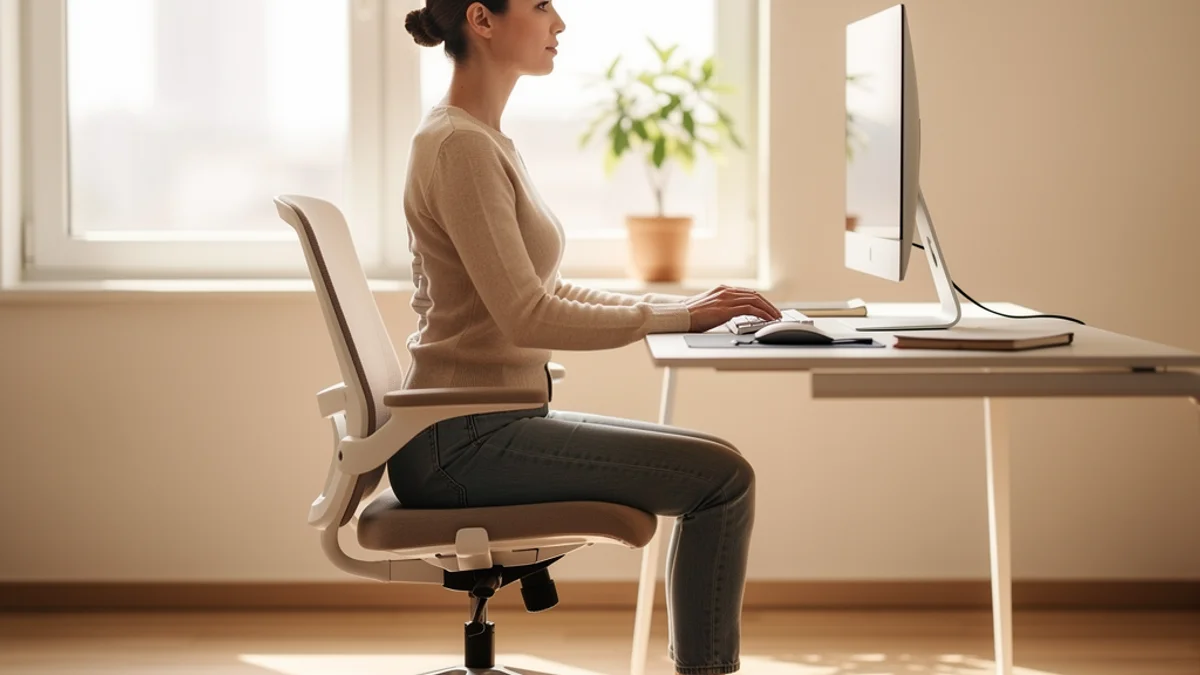
Proper desk posture means sitting with your feet flat on the floor, knees and elbows at roughly 90 degrees, lower back supported by your chair, shoulders relaxed, and the top of your monitor at eye level. It’s the alignment that lets you work for hours without your body paying the price.
You already know the basics. Sit up straight. Feet on the floor. Don’t hunch. You’ve known this for years. You sit down with perfect intentions, open your laptop, and three hours later you’re folded in half like a question mark.
This guide covers everything you need to know about how to sit properly at a desk, from correct body positions to desk setup to AI-powered posture monitoring that does the remembering for you. But more importantly, it tackles the part nobody talks about: how to actually maintain good posture throughout a full workday without thinking about it every five minutes.
Why Proper Desk Posture Matters More Than You Think
Start with the numbers, because they’re hard to ignore.
Most adults experience low back pain at some point in their lives, according to the NIH’s back pain fact sheet. For desk workers specifically, the picture is worse: research shows a 30-50% prevalence of lower back pain in any given year. Long sedentary days are common - hours spent in positions our spines were never designed for.
Bad desk posture doesn’t stop at back pain, either. It cascades. Rounded shoulders lead to neck tension. Neck tension triggers headaches. Headaches drain your focus. Reduced focus makes you less productive, which keeps you at your desk longer, which makes your posture worse. It’s a cycle.
Years of hunching over a laptop can progress from stiff shoulders to something much harder to reverse. Freelancers and developers working from kitchen tables regularly end up with a GP appointment for numb fingers that turns out to be nerve compression in the neck and shoulders. Back pain happens to everyone who ignores their desk setup long enough.
The good news? Small corrections make a genuine difference. You don’t need perfect posture all day. You need better posture, more often, with enough awareness to catch yourself when you slip.
The Correct Sitting Position: A Complete Breakdown
Proper desk posture follows a few key principles from the ground up. Think of your body as a stack of building blocks. If the foundation is off, everything above it compensates.
Feet and Legs
Start at the bottom. Your feet should sit flat on the floor, or on a footrest if your desk is too high. Knees should be at roughly 90 degrees, level with or slightly below your hips. This creates a stable base that supports everything above.
Don’t cross your legs. It feels comfortable in the moment, but it tilts your pelvis and throws your whole spine out of alignment. If you catch yourself doing it, uncross and plant both feet. Your hips will thank you by the end of the day.
Hips and Lower Back
Slide your bottom all the way to the back of the chair. This is where most people go wrong. They perch on the front edge, which removes any back support and forces the lower back to do all the work.
Your lower back has a natural inward curve called the lumbar lordosis. Your chair should support it. If your chair has built-in lumbar support, adjust it to match the small of your back. If it doesn’t, a rolled-up towel or a small cushion works surprisingly well.
Here’s a quick trick to find your neutral pelvis: sit on your hands and feel your sit bones, the two bony points at the base of your pelvis. Rock forward and back until your weight is balanced evenly on them. That’s your neutral position. It should feel effortless.
Upper Back and Shoulders
Shoulders relaxed. Not pulled back like you’re standing at attention, and not rolled forward like you’re protecting yourself from the cold. Relaxed. Let your shoulder blades settle gently down your back.
The test is simple: can you take a deep breath without your shoulders moving? If they rise when you inhale, they’re too tense. Drop them, shake them out, and try again.
Head and Neck
This is where desk posture goes wrong most often. Your head should be balanced directly over your shoulders, not jutting forward toward your screen.
For every inch your head moves forward, it adds roughly 10 pounds of extra stress on your neck. The average head weighs about 10-12 pounds. Push it two inches forward, and your neck is supporting 30+ pounds. All day. Every day.
Keep your chin slightly tucked, not exaggerated, and your ears should line up with your shoulders when viewed from the side.
Arms and Wrists
Elbows at roughly 90 degrees, close to your body. Forearms parallel to the floor. Wrists in a neutral position, not bent up or down. According to the OSHA workstation guidelines, your hands, wrists, and forearms should be straight, in-line, and roughly parallel to the floor.
If your shoulders creep up while you type, your keyboard is too high. If your wrists bend downward, it’s too low. Small adjustments here prevent big problems later.
Want help staying in this position throughout the day? SitApp uses on-device AI to monitor your posture through your webcam and gives you a friendly nudge when you start to slouch. It learns what good posture looks like for you specifically, and all processing happens on your computer. No images stored, no data uploaded.
Desk Ergonomics: How to Set Up Your Workspace for Good Posture
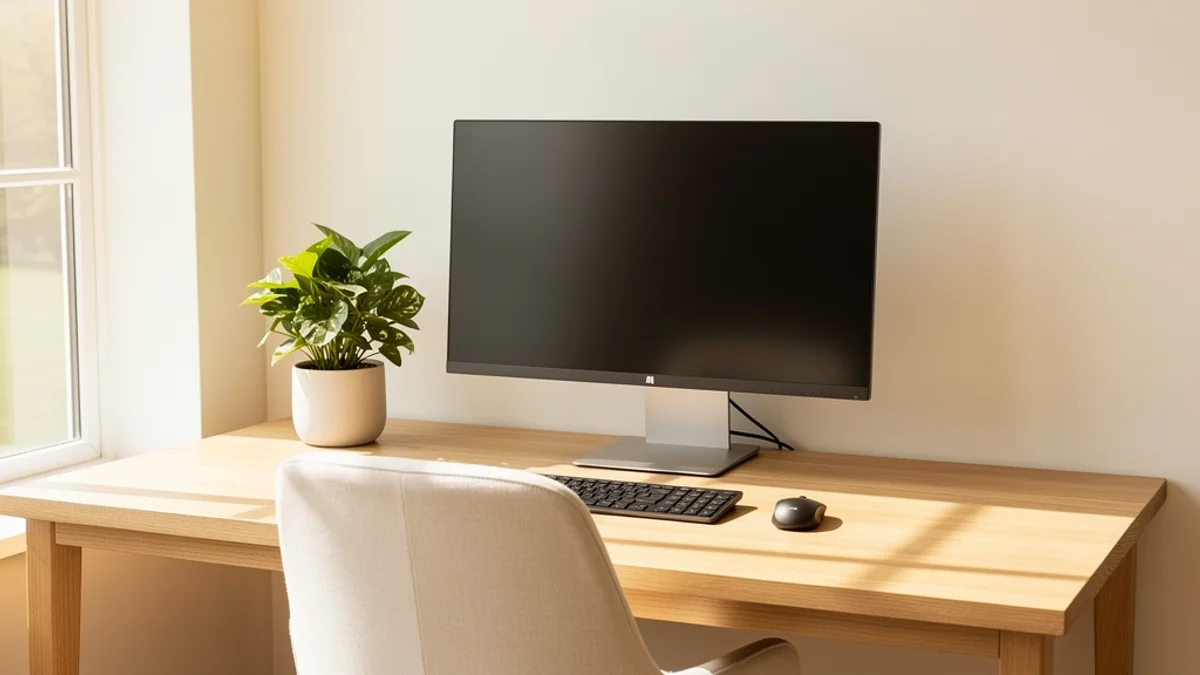
Correct body alignment means nothing if your desk ergonomics are working against you. Your workspace needs to support the posture you’re trying to maintain.
Monitor Position
The top of your screen should be at or slightly below eye level, so your gaze naturally falls about 15-20 degrees downward. Place your monitor at arm’s length distance, roughly 18-24 inches from your face.
If you use a laptop without an external monitor, you have a problem. Laptop screens sit too low, which pulls your head forward and down. A laptop stand or stack of books under the laptop, combined with an external keyboard and mouse, is one of the cheapest ergonomic upgrades you can make. It costs next to nothing, and the difference is immediate.
Chair Adjustment
Your chair is the foundation of your entire desk setup. Set the height so your feet rest flat on the floor with thighs roughly parallel to the ground. As the Mayo Clinic’s office ergonomics guide recommends, if your chair has armrests, position them so your arms rest gently while keeping your shoulders relaxed. Armrests that are too high push your shoulders up. Too low, and they’re useless.
If you don’t have an adjustable office chair, don’t panic. A firm cushion on a dining chair, a rolled towel for lumbar support, and a footrest (even a stack of books) can get you surprisingly close to a proper ergonomic sitting position.
Keyboard and Mouse
Your keyboard should sit flat or tilted slightly away from you. Those little legs on the back of most keyboards? They tilt the keyboard toward you, which bends your wrists upward. Leave them folded in.
Keep your mouse right next to your keyboard, at the same height. Reaching across the desk for your mouse dozens of times per hour adds up to shoulder and neck strain.
The Remote Worker’s Desk Setup
If you work from home, you probably don’t have a corporate ergonomics team setting up your workspace. You might be working from a kitchen table, a bedroom desk, or, let’s be honest, the couch.
The couch is your back’s worst enemy. It angles your hips lower than your knees, collapses your lower back, and pushes your head forward. If you must work from the couch for short periods, at least prop your laptop up on a cushion and sit on the edge with your feet on the floor.
A common remote-worker trajectory: a year on the couch, escalating neck pain, then a $150 investment in a proper desk, a used office chair, and a laptop stand - and the neck pain disappears within a few weeks. Basic ergonomics solves problems that feel medical.
Budget-friendly ergonomic upgrades for remote workers:
- Laptop stand ($20-40) or a stack of books (free)
- External keyboard and mouse ($30-50)
- Lumbar support cushion ($20-30)
- Footrest ($15-25, or use a box)
Total: under $100 for a dramatically better setup. Pair it with a free posture monitoring app and you’ve got a proper ergonomic workstation without the corporate budget.

The Real Problem: Remembering to Sit Properly
Here’s the honest part. You can read this entire guide, set up the perfect workstation, and nail your sitting posture at desk. Then you’ll open your email, get absorbed in a project, and 45 minutes later you’ll be slouching again.
Your brain is busy. Posture is the last thing it tracks when there’s a deadline open in another tab.
Your postural muscles fatigue over time. As they tire, you slump forward because it requires less effort. Your brain, focused on work, doesn’t register the change. By the time you notice, you’ve been hunched over for an hour.
So how do you bridge the gap between knowing what proper desk posture looks like and actually maintaining it?
The 30-Minute Rule
Movement breaks every 30 minutes significantly reduce the health risks of prolonged sitting. Stand up. Stretch. Walk to the kitchen. Take 60 seconds. Then sit back down and reset your posture. The break doesn’t need to be long - it just needs to happen.
Habit Stacking
Tie posture check-ins to things you already do. Every time you take a sip of water, check your posture. Every time you send an email, roll your shoulders back. Every time you switch tabs, plant your feet flat. These micro-corrections add up.
Technology That Watches Your Back
This is where the world has changed. Tools like SitApp use your webcam and on-device AI to monitor your computer posture in real-time. When you start to slouch, it sends a gentle nudge - a sound, a visual cue, or even a voice reminder to sit up.
SitApp runs entirely on your computer. No images are stored. No data is uploaded. Your webcam feed never leaves your device. It works like Face ID on your phone - the processing happens locally, and the data stays with you.
From download to monitoring takes about five minutes. Show the app your good posture, show your slouch, and it learns the difference. From there, it handles the awareness part so you can focus on your work.
Try SitApp free and see the difference real-time posture awareness makes. The free plan gives you one hour of daily AI-powered monitoring, enough to start building the habit.

Five Quick Exercises to Fix Desk Posture
Your desk setup handles the environment. Exercises handle the body. These five take less than five minutes total and target the exact muscles that weaken from sitting.
Chin Tucks (For Forward Head)
Sit up straight and gently slide your chin straight back, as if making a double chin. Hold for five seconds. Release. Repeat 10 times. This strengthens the deep neck flexors that keep your head balanced over your shoulders instead of drifting forward.
Chest Opener Stretch (For Rounded Shoulders)
Stand up, clasp your hands behind your back, straighten your arms, and lift your hands up while squeezing your shoulder blades together. Hold for 15-20 seconds. This counteracts the hunched position from hours of typing.
Cat-Cow Stretch (For Spine Mobility)
You can do this seated. Hands on your knees. On an inhale, arch your back and look up (cow). On an exhale, round your spine and tuck your chin (cat). Move slowly through 10 repetitions to keep your spine mobile.
Hip Flexor Stretch (For Tight Hips From Sitting)
Stand up and take a big step back with one foot. Bend your front knee and press your hips forward until you feel a stretch in the front of your back hip. Hold for 20-30 seconds per side. Sitting shortens your hip flexors, which pulls your pelvis forward and strains your lower back.
Shoulder Blade Squeezes (For Upper Back Strength)
Sit or stand with your arms at your sides. Squeeze your shoulder blades together as if you’re trying to hold a pencil between them. Hold for five seconds. Release. Repeat 15 times. Strong upper back muscles make it easier to maintain proper desk posture without tiring.
Do these once in the morning and once after lunch. Your body will notice the difference within a week.
Standing Desk Posture: What Changes?
Standing desks are popular, and for good reason. Research shows that alternating between sitting and standing can reduce upper back and neck pain by up to 54%.
But standing doesn’t automatically mean good posture. You can slouch at a standing desk too.
The principles are the same: ears over shoulders, shoulders over hips. Your monitor still needs to be at eye level, which means adjusting it higher when you stand. Distribute your weight evenly between both feet rather than leaning on one hip. And wear supportive shoes or use an anti-fatigue mat.
Don’t stand all day, either. The sweet spot is alternating: 20-30 minutes of standing, then sit back down. Neither position is healthy for hours on end. The goal is movement, not a different static position.
Warning Signs Your Posture Needs Attention
Not all discomfort is normal “desk fatigue.” Some signs point to something that deserves professional attention:
- Persistent back or neck pain that doesn’t improve with breaks and posture adjustments
- Headaches that start at your desk and worsen through the day, particularly at the base of your skull
- Tingling or numbness in your hands, arms, or fingers, which can indicate nerve compression
- Constant fatigue that isn’t explained by sleep, especially if it worsens as you sit longer
- Pain that radiates down your legs or arms
If any of these sound familiar, see a physiotherapist or your GP. Posture adjustments and exercises can fix a lot, but some conditions need professional guidance.
Frequently Asked Questions About Proper Desk Posture
What Is the 90-90-90 Rule for Sitting?
The 90-90-90 rule means your hips, knees, and elbows should all sit at roughly 90-degree angles: thighs parallel to the floor, shins vertical, forearms parallel to your desk. It’s a useful shorthand for checking your computer posture, though comfort matters more than hitting exact angles.
How Often Should I Take Breaks From My Desk?
Aim for a short movement break every 30 minutes. Stand up, stretch, walk for a minute. A longer break of five to 10 minutes every hour or two is even better. The specific timing matters less than the consistency: any regular movement beats hours of unbroken sitting.
Can Bad Posture Be Reversed?
Yes. Most posture problems from desk work (rounded shoulders, forward head, tight hip flexors) respond well to consistent exercise and workspace adjustments. Expect a few weeks to notice changes and a few months for lasting improvement. The key is daily habit, not a one-time effort.
Do Posture Corrector Devices Work?
Wearable posture correctors (straps, braces) can provide short-term reminders, but they don’t strengthen the muscles you need for long-term improvement. In fact, relying on a brace can weaken your postural muscles over time by doing their job for them. A better approach is combining workspace adjustments, strengthening exercises, and awareness tools like posture monitoring apps that remind you without doing the work for you.
Is Standing All Day Better Than Sitting?
No. Prolonged standing causes its own problems, including leg fatigue, joint compression, and circulatory issues. The research supports alternating between sitting and standing throughout the day, not replacing one static position with another.
Making It Stick
Three things actually move the needle on proper desk posture:
-
Get your setup right. Monitor at eye level, feet flat, lower back supported. This is the foundation. Without it, no amount of willpower helps.
-
Move regularly. Break up sitting every 30 minutes. Do the five exercises above once or twice a day. Your body needs variation, not perfection.
-
Build awareness. This is the piece most guides skip. Knowing how to sit properly and remembering to do it are two different things. Whether it’s habit stacking, timers, or AI-powered posture monitoring, find a system that catches you when you slip.
You don’t need to overhaul your entire life to achieve proper desk posture. A few workspace adjustments, a handful of exercises, and a way to stay aware throughout the day. Your back has been absorbing the cost of a bad setup for a while - a few small fixes go a long way.
Download SitApp free and let AI handle the awareness part. It monitors your posture through your webcam, nudges you when you slouch, and keeps everything 100% private on your device. Setup takes about five minutes.
